
What Deep Research Does
Unlike simple web searches, Deep Research is a longer procress where the agent loops through sources, checks them, makes notes and compiles a final document. How it works:- AI analyzes your query to understand what you’re really asking
- Searches multiple sources for comprehensive coverage
- Synthesizes information into a coherent response
- Provides citations so you can verify sources
- Organizes findings into a readable format
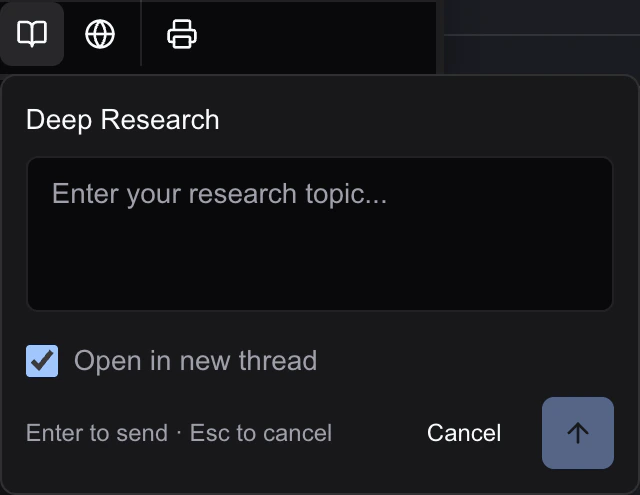
Starting Deep Research
- Head to the AI menu in the toolbar or simply ask the agent in the chat window to use the deep research tool
- Select Deep Research or the icon
- Enter your research query
- Choose whether to open results in a new thread (recommended) or current thread
- Press Enter or click the search button
Writing Effective Queries
The better your query, the better your results. More detailed prompts with lots of context information get the best results. AI cannot infer your intentions if you don’t make them explicit.Good queries are specific:
- ❌ “Tell me about exercise”
- ✅ “What are the top 5 under-desk exercise bikes for improving health while working, with cited evidence for their effectiveness?”
Include context when helpful:
- ❌ “Best practices”
- ✅ “Best practices for React component testing with Jest and React Testing Library”
Ask for what you need:
- ❌ “Productivity tips”
- ✅ “What are evidence-based strategies for eating well and staying healthy. Cite peer-reviewed research and reputable online sources. No fad diets.”
Understanding Results
Deep Research results include:- Summary - Key findings at a glance
- Detailed analysis - In-depth exploration of the topic
- Citations - Links to source material
- Related topics - Suggestions for further research
Using Results in Your Document
You can easily add research to your document:- Review the research results in the AI panel
- Use the buttons at the bottom of the chat output to insert into the main document, copy it to the clipboard or create a new document
- Or ask the AI to help you incorporate the findings
Opening in New Thread vs. Current Thread
If you use the button to launch deep research, you have the option to open in a new thread or the current thread.- New Thread (default) - Creates a dedicated thread for this research. Best for topics you want to reference later.
- Current Thread - Adds research to your existing conversation. Best for follow-up questions.
Tips for Best Results
- Be specific - Narrow queries get focused answers
- Provide context - Mention your purpose or audience
- Ask follow-ups - Deep Research remembers context within a thread
- Verify citations - Always check important sources
- Iterate - Refine your query based on initial results
Limitations
- Research quality depends on available online sources
- Breaking news may not be covered perfectly until our search engine provider indexes the results but, in general, results are very up to date and very recent
- Technical or niche topics may have limited sources
- AI can and does make mistakes (just like people). Always verify critical information independently!
Next Steps
- Web Search - For quick, current information
- Proof Reading - Verify claims in your writing