> ## Documentation Index
> Fetch the complete documentation index at: https://docs.inkstone.pro/llms.txt
> Use this file to discover all available pages before exploring further.
# AI Threads
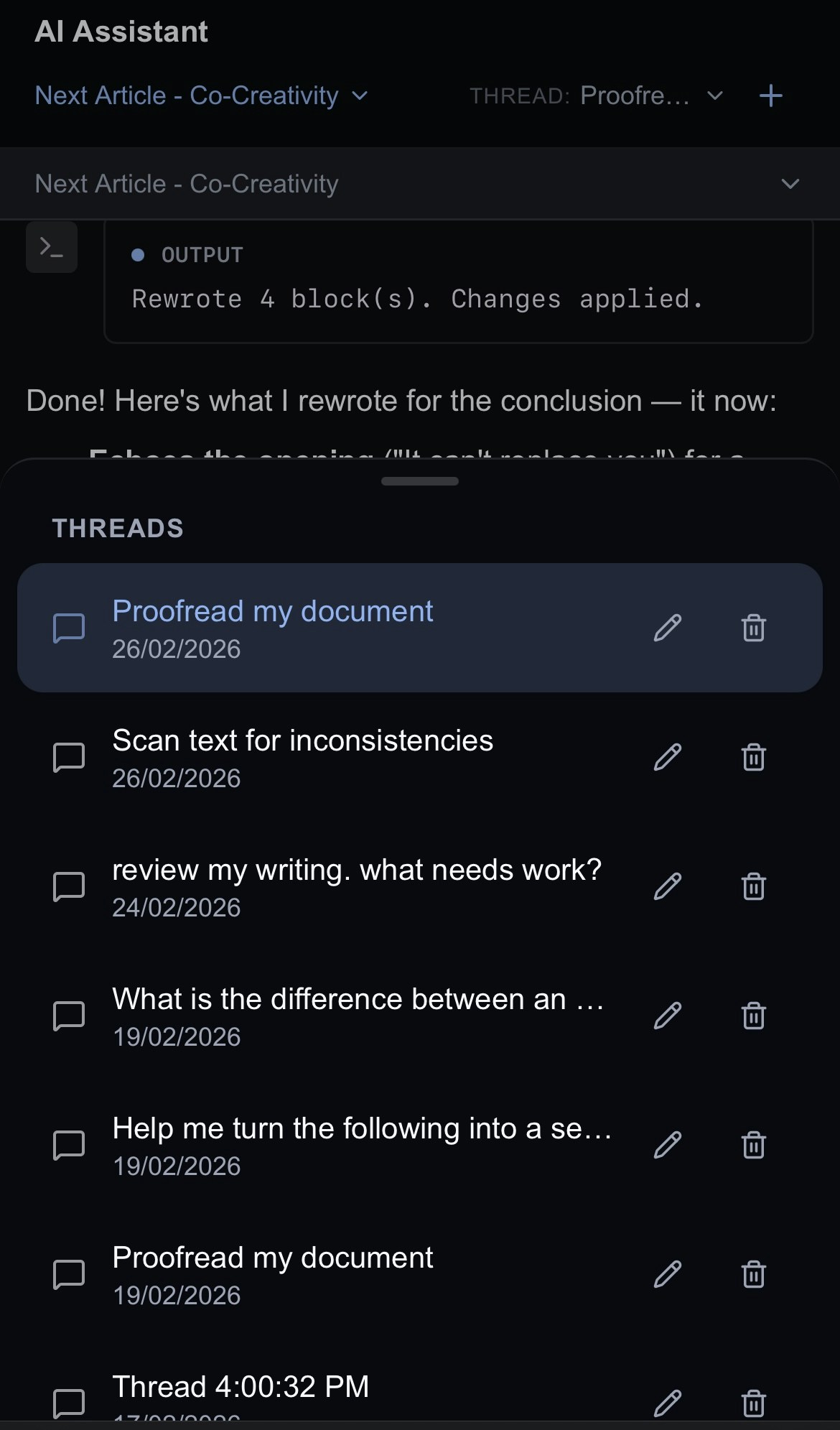
Think of threads as ongoing conversations with Jeannie. Each thread maintains context, so you can have ongoing discussions about your research and writing. Think of them as chat conversations that remember what you've discussed, can be revisited anytime, and stay attached to your project.
Want to start a new thread? Just head to the AI chat panel and click that blue **+**.
### Thread Naming
Threads are automatically named based on your first query or the type of tool you used. A Deep Research about productivity might become "Evidence-based focus strategies." This makes it easy to scan your thread list and find what you're looking for.
 ### Renaming Your Threads
Quickly rename your threads by opening the thread dropdown and hitting the to the right of the thread name. Press **Enter** to save the new name.
### Archiving Your Threads
You can easily archive your threads by opening the thread dropdown and hitting the to the right of the thread name.
## Change the Model
You can choose to work with Claude Opus 4.6, Sonnet 4.6 or GPT-5.2. We've set Claude as the default to get you started, but feel free to switch things up anytime using the dropdown menu right in the chat.
We're working on bringing even more models to the party! Got a favorite you'd love to see? Swing by our [Discord channel](https://discord.com/invite/jAfHv52SMW) and let us know—we'd love to hear from you!
## Next Steps
[Account](/account): manage your account and billing settings\
[The Home Page](/organizing-your-work): an overview of how your documents and projects are organized within Inkstone\
[Getting Started](/welcome-1): a quick introduction to the app
### Renaming Your Threads
Quickly rename your threads by opening the thread dropdown and hitting the to the right of the thread name. Press **Enter** to save the new name.
### Archiving Your Threads
You can easily archive your threads by opening the thread dropdown and hitting the to the right of the thread name.
## Change the Model
You can choose to work with Claude Opus 4.6, Sonnet 4.6 or GPT-5.2. We've set Claude as the default to get you started, but feel free to switch things up anytime using the dropdown menu right in the chat.
We're working on bringing even more models to the party! Got a favorite you'd love to see? Swing by our [Discord channel](https://discord.com/invite/jAfHv52SMW) and let us know—we'd love to hear from you!
## Next Steps
[Account](/account): manage your account and billing settings\
[The Home Page](/organizing-your-work): an overview of how your documents and projects are organized within Inkstone\
[Getting Started](/welcome-1): a quick introduction to the app